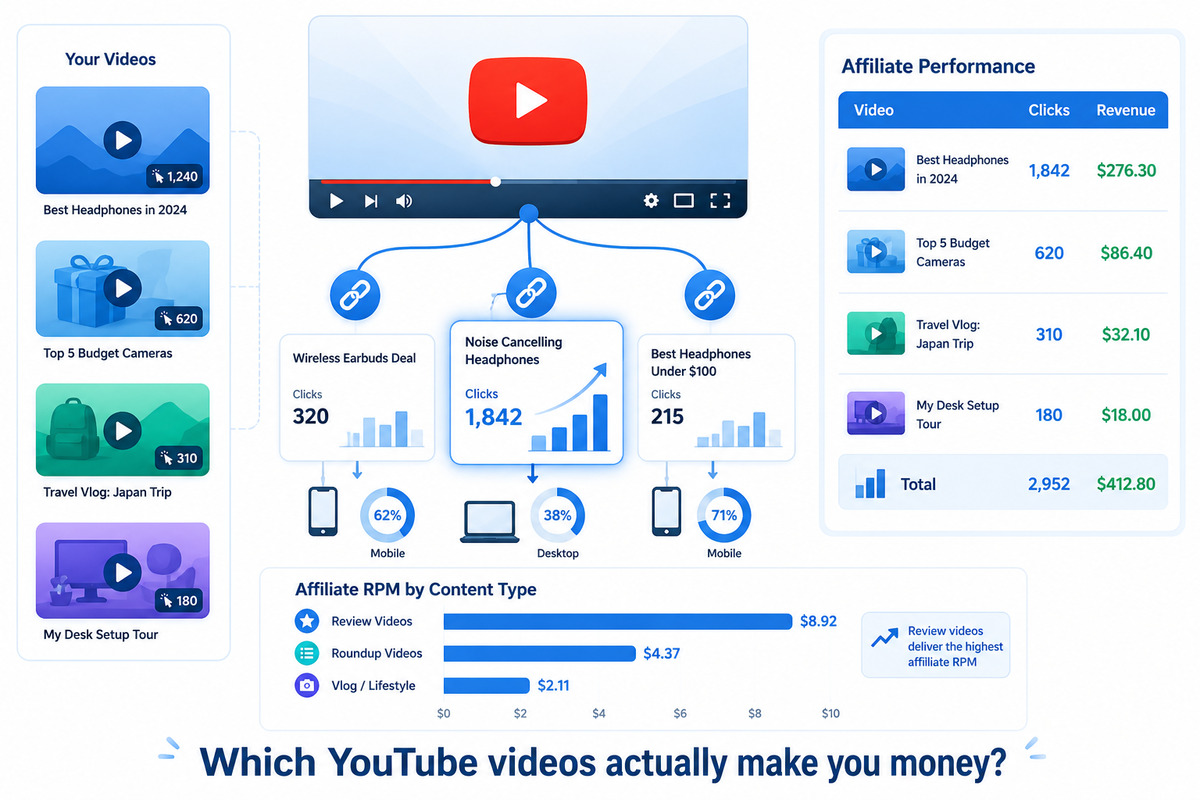
You're Leaving Money on the Table — and Your YouTube Analytics Won't Tell You
You publish two videos a week. Each one has affiliate links in the description. YouTube Studio tells you views, watch time, and ad revenue. But it tells you absolutely nothing about your affiliate links.
Which video actually sends clicks to Amazon? Does your 500K-view viral video generate more affiliate revenue than your 12K-view deep-dive review? Is anyone even clicking the links in your description?
Most YouTube creators can't answer these questions. They paste raw affiliate links into every description, hope for the best, and check their affiliate dashboard at the end of the month for a single lump-sum number with no breakdown by video.
This guide fixes that. You'll learn how to track affiliate links on YouTube at the per-video level so you know exactly which content makes you money — and which is just generating views.
Why YouTube Affiliate Tracking Is Uniquely Difficult
YouTube is one of the hardest platforms to track affiliate performance on, and it's not your fault. Here's why:
- No click analytics on description links. YouTube doesn't tell you how many people clicked the links in your description. You get views, likes, comments — but zero link click data.
- Affiliate dashboards don't show video source. Amazon Associates, ShareASale, and Impact show total clicks and sales. They don't tell you which YouTube video drove each click.
- One affiliate link, many videos. If you promote the same product in 10 videos using the same affiliate link, there's no way to attribute a sale back to a specific video.
- Pinned comments, description, and community posts. You share links in multiple places per video. Which placement gets clicked?
The result: you have a YouTube channel earning affiliate commissions, but you're completely blind to which content is driving those commissions. You can't optimize what you can't measure.
The Fix: One Unique Tracked Link per Video
The core principle is simple: never use the same affiliate link in two different videos. Each video gets its own tracked version of the link so every click can be traced back to the video that generated it.
There are two ways to do this:
- Manual UTM tagging — append UTM parameters to your affiliate links so you can identify the source video
- Dedicated link tracker — create a unique short link for each video, and the tracker handles attribution automatically
We'll cover both methods in detail.
Method 1: Manual UTM Tagging for YouTube
UTM parameters are tags you add to the end of a URL that identify where the click came from. They're free, require no tools, and work with any affiliate link.
The UTM Structure for YouTube
Here's the naming convention that works best for YouTube creators:
https://amazon.com/dp/B0EXAMPLE?tag=yourtag-20
  &utm_source=youtube
  &utm_medium=video
  &utm_campaign=best-microphones-2026
&utm_content=description| Parameter | What to put | Example |
|---|---|---|
utm_source |
Always "youtube" | youtube |
utm_medium |
Always "video" | video |
utm_campaign |
Video slug or title (unique per video) | best-microphones-2026 |
utm_content |
Link placement | description, pinned-comment, community-post |
The key is utm_campaign — this is what ties each click to a specific video. Use a short, descriptive slug that matches the video topic. Keep it lowercase, no spaces, hyphens only.
For a full breakdown of UTM parameters, see our complete UTM guide.
The Problem with Manual UTMs on YouTube
UTM tagging works, but it has real drawbacks for YouTube creators:
- Long, ugly URLs in your description. A tagged affiliate link can be 200+ characters. Viewers see a messy URL instead of a clean link.
- Error-prone. One typo in a UTM parameter and that video's data is lost. Misspelling "youtube" as "youtub" means you'll have fragmented data you can't easily reconcile.
- Time-consuming at scale. If you promote 5 products per video across 8 videos per month, that's 40 unique tagged links to create manually every month.
- Requires a separate analytics tool. UTMs only work if the destination (your blog) has Google Analytics or a similar tool installed. If you're linking directly to Amazon, the UTMs are ignored — Amazon doesn't report UTM data back to you.
Method 2: Using a Link Tracker (Recommended for YouTube)
A dedicated link tracker solves the problems UTMs can't. Here's how it works:
- You create a short, tracked link for each product in each video (e.g.,
yourdomain.com/go/mic-review-sm7b) - You put that short link in your YouTube description
- When a viewer clicks, the tracker logs the click (device, location, time, referrer) and redirects to the affiliate product page
- You see per-link click data in your tracker dashboard — broken down by video because each video has its own links
The key advantage: the tracking happens at the link level, not at the destination. It doesn't matter whether you're linking to Amazon, ShareASale, or any other merchant — every click is captured before the redirect.
What a YouTube Creator's Tracker Dashboard Looks Like
Let's say you run a tech review channel. Here's what your tracking data might look like after one month:
| Video | Product Link | Clicks | Top Device |
|---|---|---|---|
| Best Microphones 2026 | Shure SM7dB | 847 | Mobile (72%) |
| Best Microphones 2026 | Rode PodMic USB | 612 | Mobile (68%) |
| Budget Camera Setup | Sony ZV-E10 II | 1,203 | Mobile (81%) |
| Budget Camera Setup | Elgato Key Light | 289 | Desktop (54%) |
| My Studio Tour 2026 | Shure SM7dB | 94 | Mobile (76%) |
| My Studio Tour 2026 | Sony ZV-E10 II | 71 | Mobile (79%) |
Now you can see something YouTube Studio will never tell you: the "Budget Camera Setup" video drives 4x more affiliate clicks for the Sony ZV-E10 II than the same product link in "My Studio Tour 2026" — even though the studio tour has more views. The dedicated review video converts viewers into clickers far more effectively.
Real Example: How a 50K-Sub Creator Found Their Money Videos
Meet Jake. He runs a photography YouTube channel with 52,000 subscribers and publishes two videos per week. He's in Amazon Associates and B&H Photo's affiliate program. Before tracking, his monthly affiliate report looked like this:
- Amazon Associates: $680/month (clicks and sales, no video breakdown)
- B&H Photo: $340/month (same — one total number)
- Total: $1,020/month
He knew he earned roughly $1,000/month from affiliate links, but he had no idea which of his 40+ videos with affiliate links were actually responsible.
What Jake Did
- Created unique tracked links for each product in each video (going back through his top 20 most-viewed videos)
- Updated the descriptions of those 20 videos with the new tracked links
- Waited 30 days and reviewed the data
What He Found
| Video | Views (30d) | Affiliate Clicks | Click Rate | Est. Revenue |
|---|---|---|---|---|
| Best Budget Lenses 2026 | 38,000 | 2,100 | 5.5% | $410 |
| Sony A7IV Long-Term Review | 22,000 | 1,400 | 6.4% | $290 |
| Camera Bag Essentials | 15,000 | 890 | 5.9% | $180 |
| Photo Walk in Tokyo (vlog) | 95,000 | 120 | 0.13% | $15 |
| Photography Tips for Beginners | 110,000 | 85 | 0.08% | $8 |
The insight was immediate: Jake's two highest-viewed videos generated almost zero affiliate revenue. His Tokyo vlog had 95,000 views but only 120 affiliate clicks — a 0.13% click rate. Meanwhile, "Best Budget Lenses" had a fraction of the views but drove 40% of his total affiliate income.
What Jake Changed
- Doubled down on product-focused content. He shifted from one review video per month to two, because the data proved they were 50x more effective for affiliate revenue per view.
- Stopped expecting vlogs to drive affiliate income. He still makes vlogs for audience growth and ad revenue, but he no longer wastes time optimizing affiliate links in entertainment content.
- Updated his top 3 revenue videos monthly. He refreshes descriptions with current pricing, adds new related products, and ensures the tracked links are working. These three videos alone account for $880 of his $1,020 monthly affiliate income.
- Started using end screens strategically. He added end screen cards on vlogs pointing viewers to his review videos — turning high-view entertainment content into a funnel for high-converting affiliate content.
Within two months, Jake's affiliate revenue grew from $1,020 to $1,580/month — a 55% increase — without gaining any new subscribers. He just pointed his effort where the data told him it mattered.
The 5 YouTube Link Placements (and Which Ones Get Clicked)
Where you put your affiliate links on YouTube matters more than most creators think. Here's how the five main placements compare, based on aggregated click data from YouTube affiliate creators:
| Placement | Avg. Click Rate | Notes |
|---|---|---|
| First line of description | 2.5–5% | Visible without expanding "Show more." Highest performing placement. |
| Pinned comment | 1.5–3% | Visible below the video. Works especially well on mobile where viewers scroll comments. |
| Mid-description (below the fold) | 0.3–0.8% | Requires clicking "Show more." Dramatic drop-off from first line. |
| Community post | 0.5–1.5% | Good for re-promoting older videos or flash deals. Short lifespan. |
| Verbal mention only (no link) | 0.1–0.3% | "Link in the description" without a direct link. Lowest conversion. |
The First Line Is Everything
YouTube shows only the first 1-2 lines of your description before the "Show more" fold. On mobile — where 70%+ of YouTube viewing happens — most viewers never expand the description at all. This means:
- Your most important affiliate link should be in the first line of the description
- Keep it short and add a clear call to action: "Get the Sony ZV-E10 II here → [link]"
- Don't bury it under timestamps, social media links, or disclaimers
Pinned Comment Is Your Second Best Friend
A pinned comment with your affiliate link performs surprisingly well because:
- It's immediately visible below the video without any extra clicks
- On mobile, it appears before other comments
- You can update it anytime without re-uploading or editing the video
- You can make it conversational: "A lot of you asked about the microphone I used — here's the link: [tracked link]"
Setting Up Per-Video Tracking: Step by Step
Here's a practical system you can implement today, regardless of which tracking method you use.
Step 1: Create a Naming Convention
Before creating tracked links, establish a consistent naming system. This is critical — inconsistent naming makes your data unusable.
Recommended format: [video-slug]-[product-short-name]
Examples:
best-mics-2026-sm7dbbest-mics-2026-podmicbudget-camera-zve10studio-tour-key-light
Rules: all lowercase, hyphens only, no spaces, keep it short but recognizable. You'll thank yourself when you're looking at a dashboard with 200 links.
Step 2: Create Tracked Links for Each Product per Video
For every product you mention in a video, create a unique tracked link. If you review 4 microphones in one video, that's 4 tracked links for that video.
Using a link tracker like Linkgaze:
- Paste your raw affiliate link (e.g., the Amazon Associates link)
- Set the slug to your naming convention (e.g.,
best-mics-2026-sm7db) - The tracker creates a short link that automatically records every click
Using manual UTMs:
- Take your affiliate link and append UTM parameters with the video slug as the campaign
- If linking to your own blog first:
yourblog.com/go/sm7db?utm_source=youtube&utm_medium=video&utm_campaign=best-mics-2026&utm_content=description - Remember: UTMs only work if the destination has analytics installed (not for direct-to-merchant links)
Step 3: Structure Your Video Description
Here's a description template that maximizes affiliate clicks:
Get the Shure SM7dB → https://yourdomain.com/go/best-mics-2026-sm7db
More mics I recommend → https://yourdomain.com/go/best-mics-2026-all

⏱ Timestamps
0:00 Intro
1:22 Why your mic matters for YouTube
3:45 #1 Shure SM7dB
...

🎙 All products in this video:
Shure SM7dB → https://yourdomain.com/go/best-mics-2026-sm7db
Rode PodMic USB → https://yourdomain.com/go/best-mics-2026-podmic
Elgato Wave:3 → https://yourdomain.com/go/best-mics-2026-wave3
Audio-Technica AT2020 → https://yourdomain.com/go/best-mics-2026-at2020

(affiliate disclosure)
Key points: the #1 product link is above the fold (first line). Timestamps come next (YouTube uses these for chapters). The full product list with all tracked links comes after.
Step 4: Add a Verbal Call to Action in Your Video
This step is often overlooked but has a massive impact. Data consistently shows that verbal CTAs increase description link clicks by 2-4x.
What works:
- "I'll put a link to this in the description below" — simple, direct, effective
- "If you want to check the current price, I've got a link in the description" — adds a reason to click
- On-screen graphic pointing to description — visual reinforcement
What doesn't work:
- "Links in the description" without specifying which product — too vague
- Mentioning links only at the end of the video — most viewers have left by then
Step 5: Review Your Data Weekly
Set a weekly 15-minute review. Here's what to look at:
- Clicks by video. Which videos drove the most affiliate clicks this week?
- Click rate by video. Divide affiliate clicks by video views. A 3%+ click rate is strong. Below 0.5% means the audience isn't in buying mode.
- Device breakdown. If 80% of your clicks are mobile, make sure the merchant's mobile checkout works well.
- New vs. old videos. Are your older evergreen reviews still generating clicks? They often account for the majority of affiliate revenue on YouTube.
The YouTube Affiliate Revenue Formula
Once you have click data, you can calculate the actual value of each video to your affiliate business:
Affiliate Revenue per Video = Clicks × Conversion Rate × Average CommissionLet's work through a real example:
| Metric | "Best Budget Lenses" | "Tokyo Photo Walk" |
|---|---|---|
| Monthly views | 38,000 | 95,000 |
| Affiliate clicks | 2,100 | 120 |
| Click rate | 5.5% | 0.13% |
| Conversion rate (Amazon avg) | 4% | 4% |
| Avg. commission per sale | $18 | $18 |
| Est. monthly affiliate revenue | $1,512 | $86 |
| Revenue per 1,000 views | $39.79 | $0.91 |
The "Best Budget Lenses" video generates $39.79 per 1,000 views in affiliate revenue. The Tokyo vlog generates $0.91 per 1,000 views. That's a 43x difference — and you'd never know without per-video tracking.
This metric — affiliate revenue per 1,000 views (RPM) — is the single most important number for YouTube affiliate creators. It tells you which content formats are worth making more of, completely independent of view count.
Content Types Ranked by Affiliate Click Rate
Not all YouTube content converts equally. Here's a rough ranking based on typical affiliate click rates for product-related channels:
| Content Type | Typical Click Rate | Why |
|---|---|---|
| Dedicated product review | 4–8% | Viewer is actively researching a purchase |
| "Best of" roundup | 3–6% | Multiple products = multiple click opportunities |
| Comparison (A vs B) | 3–5% | Viewer is deciding between options |
| Tutorial using specific gear | 1–3% | Viewer wants to replicate the setup |
| Gear list / "what I use" | 1–2% | Curiosity-driven, lower purchase intent |
| Vlog / entertainment | 0.05–0.3% | Viewer is there for entertainment, not shopping |
If you want to grow your affiliate revenue, the data is clear: make more dedicated reviews and "best of" roundups. These formats attract viewers who are in buying mode — they came to YouTube specifically to research a purchase, and they're ready to click.
3 Mistakes YouTube Creators Make with Affiliate Links
1. Using the Same Link Across Every Video
If you paste the same Amazon link in 20 video descriptions, you'll see 20 videos' worth of clicks blended into one number. You've made it impossible to know which videos drive sales. Always create a unique tracked link for each video.
2. Only Putting Links Below the Fold
Anything after the first 1-2 lines of your description requires viewers to click "Show more." On mobile, very few people do this. Your primary affiliate link must be in the first line — before timestamps, before social links, before everything else.
3. Never Updating Old Video Descriptions
YouTube is an evergreen platform. Videos published a year ago can still drive significant traffic today. But if those videos have untracked links — or links to products that are now discontinued — you're leaking revenue. Go back through your top-performing videos at least quarterly and:
- Replace untracked links with tracked ones
- Update product recommendations if better options exist
- Verify that all links still work (broken links = lost commissions)
For more common pitfalls, see our guide on affiliate marketing mistakes to avoid.
How to Backfill Tracking on Your Existing Videos
You probably have dozens of videos with untracked affiliate links right now. Here's a prioritized approach to fix that without spending a week on it:
- Sort your videos by views (last 90 days) in YouTube Studio. Focus on the top 10-15 videos that are still getting traffic.
- For each video, identify which products are linked. Open the description and note every affiliate link.
- Create a unique tracked link for each product in each video. Use your naming convention:
[video-slug]-[product]. - Replace the old links in the description. YouTube lets you edit descriptions at any time without affecting the video.
- Move the primary link above the fold if it isn't already.
Start with your top 10 videos. These likely account for 80%+ of your affiliate clicks. You can backfill the rest over time.
YouTube Shorts and Affiliate Links
Shorts are YouTube's fastest-growing format, but they're tricky for affiliate marketing:
- Shorts descriptions are barely visible. Most viewers watch Shorts in the feed and never see the description.
- No pinned comments on Shorts. You lose your second-best link placement.
- Viewer intent is different. Shorts viewers are scrolling for entertainment, not researching purchases.
That said, Shorts can work as a funnel to your long-form reviews. A 60-second Short showing a product in action, ending with "Full review on my channel" can drive viewers to your long-form video where the affiliate links live.
If you do put affiliate links in Shorts descriptions, track them separately — use a unique tracked link with a short- prefix in your naming convention. The data will almost certainly show that Shorts have much lower affiliate click rates than long-form content, which is useful information for planning your content mix.
Putting It All Together: Your YouTube Affiliate Tracking System
Here's the complete system, summarized:
- One unique tracked link per product per video. Never reuse the same affiliate link across videos.
- Primary link above the fold. First line of description, with a clear call to action.
- Pinned comment as backup. Second link placement, especially effective on mobile.
- Verbal CTA in the video. Tell viewers the link is in the description. Say it when showing the product, not at the end.
- Consistent naming convention.
[video-slug]-[product]so your data stays organized. - Weekly 15-minute review. Check clicks by video, calculate click rates, identify your money videos.
- Quarterly backfill. Update your top-performing evergreen videos with fresh tracked links and current product recommendations.
- Calculate affiliate RPM. Revenue per 1,000 views by content type — this is the number that should drive your content strategy.
The creators who earn the most from YouTube affiliate marketing aren't necessarily the ones with the biggest channels. They're the ones who know exactly which videos generate affiliate revenue — and they make more of those videos.
Without tracking, you're guessing. With per-video tracking, you're making data-driven decisions about what content to create, which products to feature, and where to spend your limited production time.
For a broader guide on tracking affiliate links across all platforms (not just YouTube), see our cross-platform tracking guide. To calculate whether your affiliate clicks are translating to actual revenue, check out how to know which affiliate links make money.
Track Every Affiliate Click from Your YouTube Videos
Linkgaze gives YouTube creators per-video affiliate click data with automatic source detection. See which videos drive real clicks — no spreadsheets, no manual UTM tagging.
- Per-video click tracking with zero manual tagging
- Device and location data for every click
- Free tier with up to 25 tracked links