Rebrandly Is Built for Branded Links — Not Affiliate Tracking
Rebrandly is one of the most popular branded link management platforms. It's been around since 2015, and it does one thing well: turning ugly URLs into clean, branded short links with your own custom domain.
If all you need is yourbrand.co/promo instead of a long URL — Rebrandly handles that beautifully.
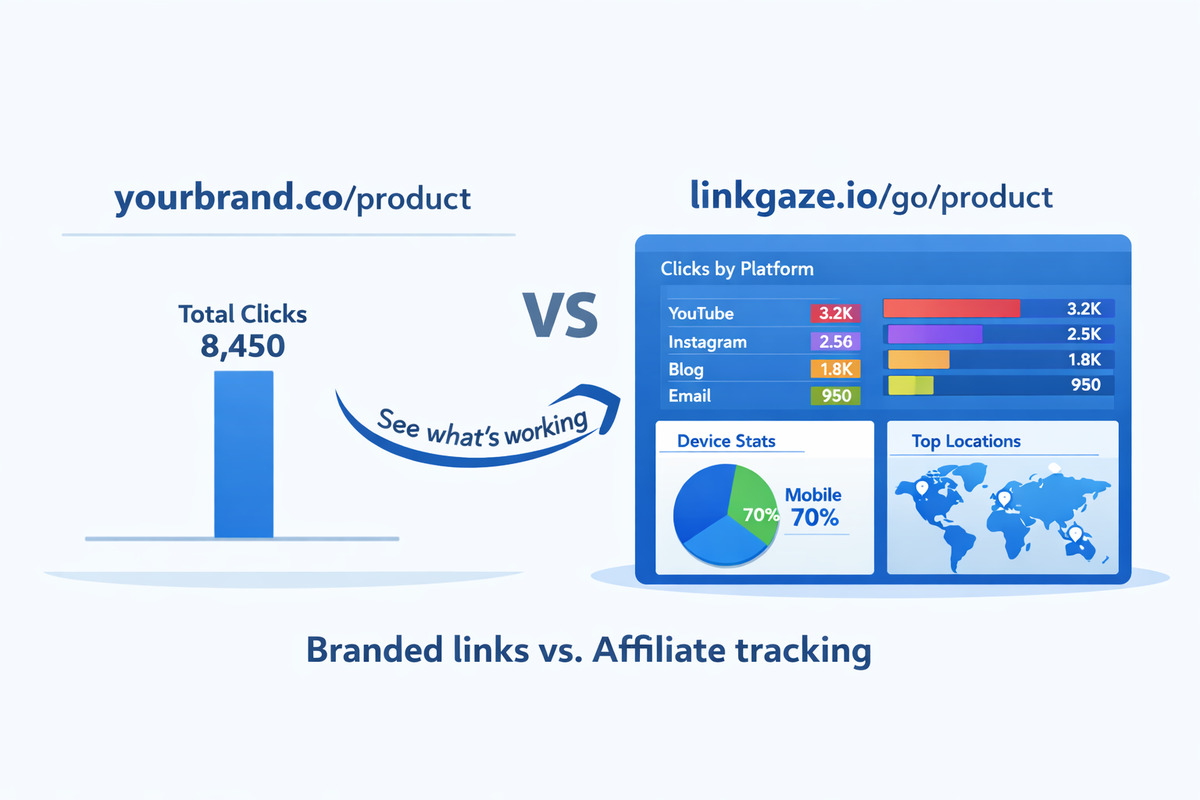
But if you're an affiliate marketer or content creator promoting products across YouTube, Instagram, your blog, and email — Rebrandly leaves you with a critical blind spot: you can't see which platform actually drives your clicks and revenue.
Rebrandly tracks total clicks. It doesn't automatically tag traffic sources, break down clicks by platform, or give you the affiliate-specific analytics you need to make smart decisions about where to spend your time.
That's the gap Linkgaze fills.
Rebrandly vs. Linkgaze: Quick Overview
| Feature | Rebrandly | Linkgaze |
|---|---|---|
| Primary focus | Branded link management | Affiliate link tracking |
| Custom domains | 1 free, up to 10+ on paid plans | 1 on Pro ($29/mo) |
| Automatic UTM tracking | ❌ Manual only | ✅ Automatic on every link |
| Per-platform click breakdown | ❌ | ✅ |
| Device breakdown | ❌ Not on lower tiers | ✅ Starter ($12/mo) and up |
| Geo-location tracking | Basic (country-level on paid plans) | Country on Starter, city on Pro |
| Link limits | 10/mo free, 250–3,500/mo on paid | 10 free, unlimited on Starter+ |
| Click limits | Unlimited clicks, limited tracking (100–10K/mo) | 1K free, 10K Starter, unlimited Pro |
| A/B testing | ❌ | ✅ Pro plan |
| Team features | ✅ Professional+ (2–5 teammates) | ❌ Solo creators focus |
| QR codes | ✅ Built-in | ❌ |
| Free tier | 10 links/mo, 1 domain, 100 clicks tracked | 10 links, 1K clicks/mo, basic UTM |
| Starting paid price | $11/mo ($8/mo annual) | $12/mo ($10/mo annual) |
In short: Rebrandly is a branded link platform with team collaboration and custom domains. Linkgaze is an affiliate link tracker with automatic UTM tagging and per-platform analytics. They solve different problems.
Where Rebrandly Falls Short for Affiliate Marketers
1. No Automatic UTM Tracking
This is the biggest gap. When you share an affiliate link through Rebrandly, it shortens the URL and gives you a branded link. That's it.
If you want to know whether a click came from YouTube, Instagram, or your email newsletter, you have to manually add UTM parameters to every single link, for every single platform, every single time.
That means instead of one link, you're creating and managing three or four versions:
yourbrand.co/headphones?utm_source=youtube&utm_medium=videoyourbrand.co/headphones?utm_source=instagram&utm_medium=storyyourbrand.co/headphones?utm_source=blog&utm_medium=post
With Linkgaze, you create one link. UTM parameters are added automatically based on where the click originates. Share the same link on YouTube, Instagram, and your blog — Linkgaze tags each click with the correct source without you doing anything.
2. No Per-Platform Click Breakdown
Rebrandly tells you a link got 500 clicks. But it doesn't break those clicks down by traffic source in a meaningful way for affiliate marketers.
As an affiliate, knowing you got 500 clicks is nice. Knowing that 320 came from YouTube, 110 from your blog, and 70 from Instagram is actionable. That's the difference between data and insight.
Linkgaze's dashboard shows you exactly where every click came from, so you can double down on what works and stop wasting time on what doesn't.
3. Limited Analytics on Lower Tiers
Rebrandly's free plan only tracks 100 clicks per month. For an affiliate marketer, that's essentially nothing — a single popular link can exceed that in a day.
Even on the Essentials plan ($11/month), you're limited to 10,000 tracked clicks. The links still redirect (unlimited clicks), but the analytics data caps out at 10K. After that, you're flying blind.
Linkgaze's free tier tracks 1,000 clicks per month — 10x more than Rebrandly's free plan. The Starter plan ($12/month) tracks 10,000 clicks with full source, device, and country data. And Pro ($29/month) gives you unlimited click tracking.
4. Link Limits That Don't Fit Affiliate Workflows
Rebrandly limits how many links you can create per month:
- Free: 10 links/month
- Essentials ($11/mo): 250 links/month
- Professional ($32/mo): 1,500 links/month
- Growth ($99/mo): 3,500 links/month
For a content creator promoting dozens of products across multiple platforms, 250 links per month can feel tight — especially if you're creating separate branded links for different campaigns.
Linkgaze's Starter plan ($12/month) gives you unlimited links. No monthly caps, no surprises.
5. Pricing Gets Expensive for What You Get
Here's where the math really matters for affiliate marketers:
| What you need | Rebrandly cost | Linkgaze cost |
|---|---|---|
| Unlimited links | Enterprise (custom pricing) | $12/mo (Starter) |
| 10K+ tracked clicks | $32/mo (Professional) | $12/mo (Starter) |
| Unlimited tracked clicks | Enterprise (custom pricing) | $29/mo (Pro) |
| Automatic UTM tracking | Not available | All plans (including Free) |
| Per-platform analytics | Not available | All plans |
| Device breakdown | Not available on lower tiers | $12/mo (Starter) |
| A/B testing | Not available | $29/mo (Pro) |
| Custom domain | Free (1 domain included) | $29/mo (Pro) |
Rebrandly's strength — custom domains on every plan — is genuine. But if you're paying $32/month or more for Professional just to get enough tracked clicks, and you're still not getting automatic UTM tracking or per-platform breakdowns, you're paying more for less of what affiliate marketers actually need.
Where Rebrandly Beats Linkgaze
This isn't a one-sided comparison. Rebrandly has real advantages in several areas:
Custom Domains on Every Plan
Rebrandly includes 1 custom domain on the free plan and up to 10 on Growth ($99/mo). If branded links with your own domain are your top priority, Rebrandly has a clear edge.
Linkgaze only offers custom domains on the Pro plan ($29/month), and it's limited to 1 domain. If you need multiple branded domains, Rebrandly is the stronger choice.
Team Collaboration
Rebrandly supports workspaces and teammates starting on the Professional plan ($32/month). You can add team members, assign roles, and manage links collaboratively.
Linkgaze is built for solo creators and small operators. There are no team features. If you run a marketing agency or work with a team, Rebrandly fits that workflow better.
QR Codes
Rebrandly includes QR code generation on all plans, including free. If you need QR codes for physical marketing, packaging, or events, Rebrandly has it built in.
Linkgaze doesn't offer QR code generation.
Link Galleries (Link-in-Bio)
Rebrandly offers link galleries — their version of link-in-bio pages — on all plans. These let you create a landing page with multiple links, similar to Linktree.
Linkgaze doesn't have a link-in-bio feature. If that's important to you, Rebrandly covers it.
Traffic Routing
Rebrandly's Professional plan and above supports traffic routing — sending visitors to different destinations based on rules. This is useful for geo-targeting or A/B scenarios.
While Linkgaze offers A/B testing on Pro, Rebrandly's traffic routing is more flexible for non-affiliate use cases.
Head-to-Head: Detailed Feature Comparison
Link Management
| Feature | Rebrandly | Linkgaze |
|---|---|---|
| Custom branded domains | 1 free, 2–10+ on paid plans | 1 on Pro ($29/mo) only |
| Custom back-halves (slugs) | ✅ All plans | ✅ Starter ($12/mo) and up |
| Monthly link creation limit | 10–3,500/mo (plan-dependent) | 10 free, unlimited on Starter+ |
| Link editing after creation | Limited (10–150/mo depending on plan) | ✅ Unlimited |
| Link expiration | ✅ Professional+ ($32/mo) | ❌ |
| Password-protected links | ✅ Professional+ ($32/mo) | ❌ |
| QR codes | ✅ All plans | ❌ |
Analytics & Tracking
| Feature | Rebrandly | Linkgaze |
|---|---|---|
| Total click tracking | 100–10K/mo tracked (unlimited redirects) | 1K free, 10K Starter, unlimited Pro |
| Automatic UTM parameters | ❌ | ✅ All plans |
| Per-platform breakdown | ❌ | ✅ All plans |
| Device breakdown (mobile/desktop) | ❌ Not on lower tiers | ✅ Starter ($12/mo)+ |
| Country-level geo | On paid plans | ✅ Starter ($12/mo)+ |
| City-level geo | ❌ | ✅ Pro ($29/mo) |
| Analytics retention | Not publicly specified | 30 days free, 90 days Starter, 1 year Pro |
| A/B testing | ❌ | ✅ Pro ($29/mo) |
| Data export (CSV) | ✅ Paid plans | ✅ Starter ($12/mo)+ |
Pricing Comparison
| Plan | Rebrandly | Linkgaze |
|---|---|---|
| Free | 10 links/mo, 1 domain, 100 clicks tracked | 10 links, 1K clicks/mo, 30 days analytics, basic UTM |
| Entry paid | Essentials: $11/mo ($8/mo annual) — 250 links, 10K clicks tracked, 2 domains | Starter: $12/mo ($10/mo annual) — unlimited links, 10K clicks, 90 days analytics, full UTM, device + country data |
| Mid-tier | Professional: $32/mo ($22/mo annual) — 1,500 links, 2 teammates, 3 domains, traffic routing | Pro: $29/mo ($24.17/mo annual) — unlimited clicks, 1 year analytics, 1 custom domain, city geo, A/B testing |
| High-tier | Growth: $99/mo ($69/mo annual) — 3,500 links, 5 teammates, 10 domains | — |
| Enterprise | Custom pricing, unlimited everything | — |
Real-World Scenario: Affiliate Creator with 50 Products
Let's make this concrete. Meet Alex — a tech reviewer promoting 50 affiliate products across YouTube, a blog, and an email newsletter.
Alex's Workflow with Rebrandly
- Copies the affiliate link for a wireless mouse from Amazon.
- Creates a branded link:
alextech.co/mouse - Wants to track where clicks come from, so manually creates 3 versions with UTM parameters:
alextech.co/mouse?utm_source=youtubealextech.co/mouse?utm_source=blogalextech.co/mouse?utm_source=email
- Shares the correct link on each platform (and hopes he doesn't mix them up).
- Repeats this for all 50 products × 3 platforms = manages 150 separate links.
- Checks the Rebrandly dashboard: sees total clicks per link, but still needs Google Analytics to see the UTM breakdown.
Time per product: ~5 minutes. Monthly link count: 150+ (needs Professional plan at $32/mo to avoid hitting limits). Still requires Google Analytics for source data.
Alex's Workflow with Linkgaze
- Copies the affiliate link for the wireless mouse.
- Pastes it into Linkgaze. Creates one short link:
linkgaze.io/go/mouse - Shares the same link on YouTube, blog, and email.
- Linkgaze automatically tags each click with the source platform.
- Checks the Linkgaze dashboard: YouTube sent 280 clicks, blog 150, email 95. Blog clicks have the highest conversion rate.
- Decides to prioritize written reviews and reduce video production frequency.
Time per product: ~1 minute. Total links: 50 (one per product). Cost: $12/month (Starter plan for unlimited links and full analytics). No external analytics needed.
The Difference
| Rebrandly | Linkgaze | |
|---|---|---|
| Links to manage | 150+ (3 per product) | 50 (1 per product) |
| Setup time per product | ~5 minutes | ~1 minute |
| Monthly cost | $32/mo (Professional) | $12/mo (Starter) |
| External tools needed | Google Analytics for source breakdown | None — built into dashboard |
| Branded domain | ✅ alextech.co | ❌ (Pro for custom domain) |
If branded domains are Alex's top priority, Rebrandly wins. If knowing which platform drives revenue matters more, Linkgaze delivers that insight at a third of the cost.
When You Should Stick with Rebrandly
Rebrandly is the better choice in these situations:
- Branded domains are your #1 priority. If your links must look like
yourbrand.co/productand you need multiple branded domains, Rebrandly's custom domain support is best-in-class. - You work on a team. Rebrandly's workspace and teammate features (Professional+) support collaborative link management that Linkgaze doesn't offer.
- You need QR codes. Rebrandly generates QR codes for every link, built right into the platform.
- You need link-in-bio pages. Rebrandly's link galleries work as a built-in alternative to Linktree.
- You're a marketing agency managing client links. The workspace model, team roles, and multi-domain support are designed for agency workflows.
- You don't do affiliate marketing. For general branded link management, SaaS marketing, or corporate link shortening, Rebrandly's feature set is a natural fit.
When You Should Switch to Linkgaze
- You promote affiliate links across 2+ platforms and need to know which one drives your clicks and revenue.
- You're tired of manually creating UTM-tagged links for every product on every platform. Linkgaze handles this automatically.
- You want per-platform and per-device analytics without needing Google Analytics or a $32/month plan.
- You want unlimited links without monthly caps. Linkgaze Starter ($12/month) removes link creation limits entirely.
- You want A/B testing for your affiliate links. Test which product page or landing page converts better — Linkgaze Pro ($29/month) includes this.
- You want simple, all-in-one affiliate tracking. One link per product, automatic tagging, one dashboard for all your data.
Can You Use Both?
Yes — and for some creators, that's the ideal setup.
Use Rebrandly for links where branding matters most: social media profiles, business cards, QR codes on packaging, or any link that will be visible and needs to look professional with your own domain.
Use Linkgaze for your actual affiliate links where tracking matters: product recommendations, review content, email campaigns — anywhere you need to know which platform and which content drives clicks and commissions.
The two tools complement each other rather than conflict. One is about how your links look. The other is about understanding what your links do.
Switching from Rebrandly to Linkgaze
If you decide to move your affiliate links to Linkgaze, here's a straightforward migration plan:
- Start with your top 10 affiliate products. Don't migrate everything at once — focus on the links that generate the most revenue.
- Create Linkgaze short links for each product. One link per product — no need for platform-specific versions.
- Replace Rebrandly links in your YouTube descriptions, blog posts, and email templates with the new Linkgaze links.
- Keep your Rebrandly account active. Your old branded links still redirect. Don't break existing content.
- Review your Linkgaze dashboard after 7 days. You'll immediately see the platform-by-platform breakdown you were missing.
The migration takes about 20 minutes for 10 products. For a detailed walkthrough on setting up multi-platform tracking, see our guide on how to track affiliate links across platforms.
The Bottom Line
Rebrandly is an excellent branded link management platform. For custom domains, team collaboration, QR codes, and professional link branding, it's one of the best options available.
But for affiliate marketers and content creators who need to know which platform drives their revenue — Rebrandly's analytics are too limited and too expensive for what you actually get.
Linkgaze gives you the affiliate-specific tracking that Rebrandly doesn't: automatic UTM parameters, per-platform click analytics, device and location data, and A/B testing — starting at $12/month with unlimited links. No manual tagging, no external analytics tools, no monthly link caps.
If your links are revenue drivers that need real tracking — not just branded URLs — give Linkgaze a try alongside Rebrandly and see which dashboard actually helps you make better decisions.
For a broader comparison of all the options, check out our guide to the best affiliate link trackers for content creators.
Ready to Track What Actually Matters?
Linkgaze gives affiliate marketers the analytics Rebrandly doesn't — automatic UTM tracking, per-platform click data, and device breakdowns starting at $12/month.
- Free tier with basic UTM tracking — no credit card needed
- Automatic source tracking across every platform
- See clicks by platform, device, and location