The Most-Asked Question in Affiliate Marketing
Every affiliate marketer eventually asks the same question: "Is my click-through rate any good?"
You see your numbers. 2,000 people saw the post, 30 clicked the affiliate link. That's a 1.5% CTR. Is that great? Mediocre? Embarrassing? Without benchmarks, you have no way to tell.
The honest answer: a "good" affiliate CTR depends entirely on the platform, content type, and audience relationship. A 1.5% CTR is excellent for a TikTok bio link and disappointing for an email newsletter to a warm list. Context is everything.
This guide gives you the real numbers — CTR benchmarks across blogs, email, YouTube, Instagram, TikTok, and more — based on aggregate data from affiliate marketers in 2025–2026. Then we'll walk through nine concrete tactics to improve your CTR, no matter which platform you're working with.
First, How to Calculate Affiliate Link CTR
Click-through rate is the percentage of people who saw your content and then clicked an affiliate link. The formula is simple:
CTR = (Affiliate Clicks ÷ Impressions) × 100
The tricky part is defining "impressions" correctly. It varies by platform:
- Blog post: Page views to the post containing the link
- Email: Number of email opens (or sometimes total recipients)
- YouTube: Video views
- Instagram story: Story views
- Instagram post: Post impressions (note: bio link clicks measured differently)
- TikTok: Video views (with bio link traffic measured separately)
If you're getting click data from a link tracker like Linkgaze and view data from the platform itself, you can calculate CTR for any link on any platform. This is one of the main reasons creators use dedicated tracking — affiliate dashboards rarely tell you which post or video produced the clicks.
For a full walkthrough of attribution and tracking setup, see our guide on how to know which affiliate links make money.
Affiliate Link CTR Benchmarks by Platform
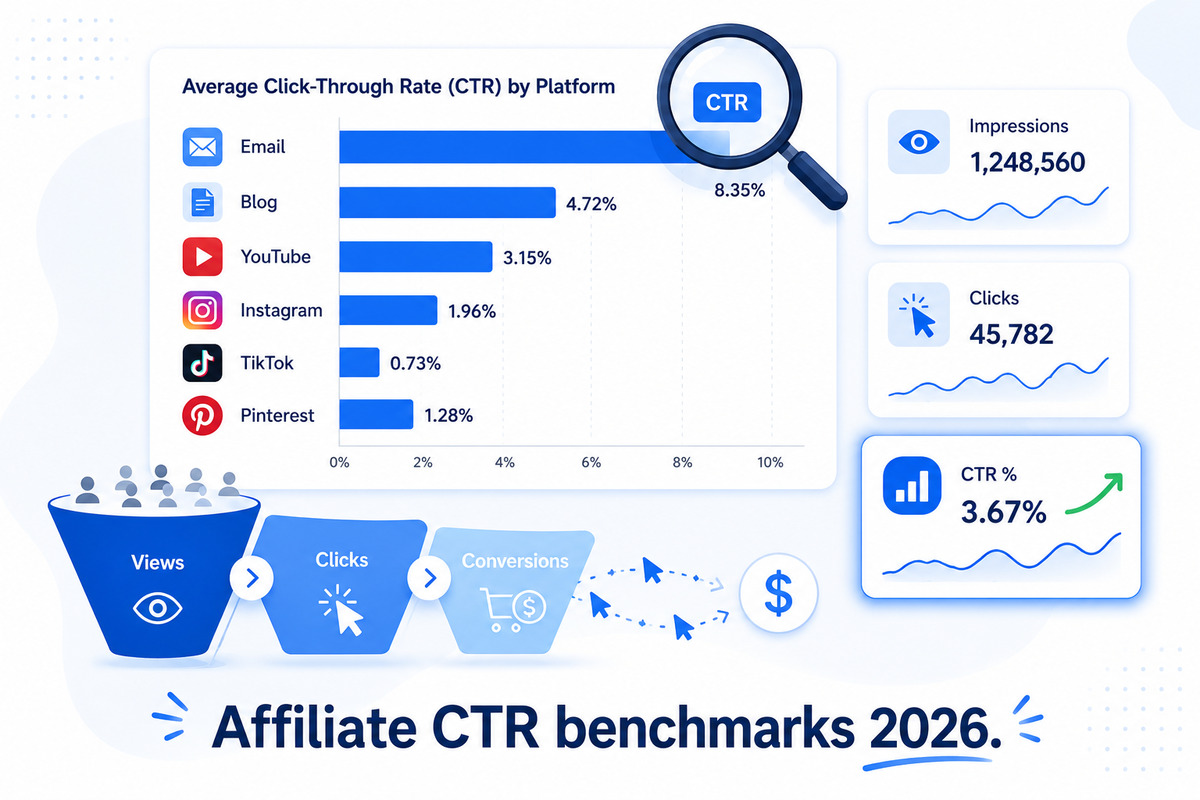
Here are realistic CTR ranges for affiliate links across the major platforms in 2026. These are aggregated from creator surveys, affiliate network reports, and tracking data from thousands of campaigns.
| Platform / Content Type | Low (poor) | Average | High (excellent) |
|---|---|---|---|
| Blog post (in-content link) | Under 1% | 2–4% | 6–10%+ |
| Blog post (sidebar / banner link) | Under 0.2% | 0.3–0.7% | 1–2% |
| Email newsletter (in-content) | Under 1% | 2–5% | 8–15% |
| Email (dedicated affiliate send) | Under 2% | 4–8% | 10–20% |
| YouTube video description link | Under 0.3% | 0.5–1.5% | 2–4% |
| YouTube pinned comment link | Under 0.5% | 1–2% | 3–5% |
| Instagram bio link | Under 0.5% | 1–3% | 5–8% (of profile visits) |
| Instagram story (link sticker) | Under 1% | 2–5% | 8–15% |
| TikTok bio link | Under 0.1% | 0.3–0.8% | 1–2% |
| Pinterest pin (direct affiliate) | Under 0.2% | 0.5–1.5% | 2–4% |
| Twitter / X (single tweet) | Under 0.5% | 1–2% | 3–6% |
| Podcast show notes link | Under 0.5% | 1–3% | 5–8% |
A few important notes about reading this table:
- "High" doesn't mean unrealistic. These are real numbers that experienced creators hit consistently with the right product fit, audience, and content strategy.
- "Low" doesn't always mean failure. A 0.3% CTR on a 500,000-view TikTok video is still 1,500 clicks. Volume and CTR matter together.
- Audience warmth changes everything. A cold blog visitor who arrived from Google has different behavior than your email subscribers of three years.
Why CTR Varies So Much Between Platforms
Looking at the table, you might wonder: why does email convert at 4–8% while TikTok struggles to hit 1%? Three reasons drive most of the variance.
1. Intent and Context
Email subscribers actively chose to hear from you. They opened the email expecting your recommendation. TikTok viewers are scrolling for entertainment — they didn't ask to be sold to. Higher intent = higher CTR. This is why "buying intent" content (product reviews, "best of" roundups, problem-solving how-tos) consistently outperforms entertainment content for affiliate CTR, regardless of platform.
2. Friction to Click
How many taps does it take to reach the affiliate link?
- Blog in-content link: 1 click (lowest friction)
- Email link: 1 click
- YouTube description: 2 actions (expand description, click link)
- Instagram bio link: 2 actions (tap profile, tap link)
- TikTok bio link: 2–3 actions (tap profile, find link, tap)
Each extra step cuts your click-through rate by 30–60%. This is why Instagram stories with the link sticker (1 tap to click) convert dramatically better than Instagram posts pointing to "link in bio" (3 taps to click).
3. Audience Relationship
Email subscribers and blog readers tend to know who you are. They've been visiting your site or opening your emails for months. TikTok viewers might be seeing you for the first time. Trust drives clicks, and trust is built over time. New audiences click less. Established audiences click more.
The CTR Mistake That Kills Affiliate Revenue
Before we get into how to improve your CTR, let's address the trap: optimizing for CTR can actually decrease your revenue.
Here's how it happens. You see your CTR is 1.2% on a product roundup post. You read that "good" CTR is 4–6%. So you start adding more aggressive CTAs, bigger buttons, urgency language ("Limited time!"), and link the affiliate product everywhere. CTR goes up to 4%. But conversion rate drops, because the people clicking aren't ready to buy. Total commissions stay flat or fall.
The metric that actually matters is revenue per impression, not CTR alone. CTR is a useful diagnostic — if it's low, something is wrong — but raising CTR by reducing relevance hurts you. Always think about CTR alongside conversion rate.
A rough rule of thumb:
- CTR low, conversion rate high → your link placement needs work (the right people aren't seeing the link)
- CTR high, conversion rate low → wrong product, wrong audience, or misleading CTA
- CTR low, conversion rate low → wrong content/product fit entirely
- CTR high, conversion rate high → keep doing what you're doing
9 Tactics to Improve Your Affiliate CTR
Now the practical part. These are the tactics that consistently move CTR upward across platforms.
1. Match the Product to the Content Intent
Linking a kitchen blender from a yoga mat review post will get a near-zero CTR. The audience showed up for one thing; you're offering another. The single biggest CTR lever is product relevance.
Before adding an affiliate link, ask: "Did the person reading or watching this content come here specifically interested in this kind of product?" If yes, link it. If no, save it for content that's a better match.
2. Use Contextual Links Inside Content
Banner ads and sidebar links get ignored. In-content links (inside paragraphs, after a sentence that explains the product) consistently outperform display-style placements by 5–20x.
Bad placement: A "Buy on Amazon" button at the bottom of a 2,000-word review.
Good placement: Linking the product name the second time it's mentioned in the article, ideally right after a sentence like "I've been using this for six months and here's why it's worth the price."
3. Front-Load Your Strongest Recommendation
If a reader is going to bounce, they bounce within the first 30 seconds. The link they never see can't get clicked. For roundup posts, put your top pick at or near the top, with a clear "best overall" framing and a direct affiliate link.
For YouTube descriptions, put your single most important affiliate link at the top of the description box — above the "show more" cutoff. For email, your affiliate link should appear before subscribers scroll.
4. Write CTAs That Match Audience Stage
"Buy now" works for hot audiences (email subscribers, repeat blog readers). It flops with cold audiences (organic search traffic, TikTok viewers).
Better CTA language for cold audiences:
- "See current price on [retailer]"
- "Check availability"
- "Read more reviews on [retailer]"
- "Get the exact product"
These phrasings imply low commitment (just a price check) and remove sales pressure, which often increases clicks from people who would have bounced from a hard CTA.
5. Use Instagram Story Link Stickers (Not "Link in Bio")
For Instagram specifically: every "link in bio" CTA is a CTR killer. The story link sticker is one tap to click. "Link in bio" is three actions (read post, swipe up, navigate to profile, tap link).
If you have access to story link stickers, use them. CTR on story links is typically 5–10x higher than CTAs pointing back to a bio link.
6. Track and Test Link Placement Within Long Content
For a 3,000-word blog post or 15-minute YouTube video, you have multiple potential link placements. Create a separate tracked link for each placement (early, middle, late, comment, description) and watch which one gets the most clicks.
You'll often find that one specific placement is responsible for 60–80% of clicks. Once you know where it is, you can write future content with that placement in mind from the start.
7. Pin a Comment with Your Top Affiliate Link (YouTube & TikTok)
YouTube and TikTok both let you pin a comment. A pinned comment with a clear "Here's the product I mentioned: [link]" message typically gets 2–3x the CTR of the description link alone. The pinned comment is visible to every viewer who looks at comments, which is a large percentage of engaged viewers.
8. Match Link Anchor Text to Search Intent
For blog content, the anchor text matters. "Click here" or "this product" get ignored. The product name itself, especially with a clear modifier ("the [brand] [model] sander I use"), draws the eye and signals relevance.
This also helps with the perception of authenticity — generic CTAs feel like ads, descriptive anchors feel like recommendations.
9. Reduce the Number of Competing Links
If your blog post has 14 affiliate links, your reader has 14 choices. Choice paralysis is real, and total clicks usually drop as you add more options.
Better approach: for any given piece of content, pick one or two primary affiliate products. Link those clearly and confidently. The CTR on each link will be higher because the reader isn't distracted by alternatives.
What "Good" Looks Like at Different Scales
One more way to think about CTR: in absolute click numbers, not just percentages. A 5% CTR on 200 impressions is 10 clicks. A 0.5% CTR on 50,000 impressions is 250 clicks. The second creator has 25x the affiliate revenue from a much "worse" CTR.
This is why you can't blindly compare your CTR to a top creator's. They might be optimizing for volume (broad reach, lower CTR) while you're optimizing for engagement (smaller audience, higher CTR). Both work. They're just different strategies.
A practical way to benchmark yourself:
- Track CTR per affiliate link for one full month
- Identify your top 5 highest-CTR links
- Identify your bottom 5 lowest-CTR links
- Look at what's different — placement, audience, content type, product
- Apply the patterns from your winners to your future content
Your own data is more valuable than industry benchmarks because it reflects your specific audience, niche, and content style.
How to Track CTR If You Don't Already
To calculate CTR for any affiliate campaign, you need two numbers: impressions (from the platform) and clicks (from your link tracker).
Most affiliate dashboards (Amazon Associates, ShareASale, Impact, etc.) report clicks in aggregate, not per content piece. So if you publish three blog posts in a week that all link to the same affiliate product, your affiliate dashboard shows one click total — not which post drove which clicks.
The fix is using a tracked short link for each content piece. With Linkgaze, you create a unique tracked link per post, video, email, or campaign. Each link records its own clicks, so you can divide by the platform's impressions to get CTR for that specific piece of content.
Setup takes a few minutes per affiliate product. Once you have unique tracked links for each placement, calculating CTR becomes a 30-second exercise per campaign instead of "I have no idea."
For a step-by-step tracking setup, read our complete affiliate tracking guide for 2026.
The Bottom Line on Affiliate CTR
A "good" affiliate CTR isn't a single number. It depends on your platform, audience warmth, content type, and product fit. As a rough guide:
- Email to a warm list: aim for 4%+
- Blog in-content link: aim for 2%+
- YouTube description: aim for 1%+
- Instagram stories: aim for 3%+
- TikTok bio link: 0.5%+ is solid
If you're hitting the average range for your platform, you're doing fine. If you're below it, the tactics in this guide will move you up. If you're at the high end, focus on conversion rate next — that's where the real revenue growth happens.
The most important rule: don't obsess over CTR in isolation. Track CTR alongside clicks-per-content-piece and conversion rate. The creators who grow their affiliate income year over year aren't the ones with the highest CTR — they're the ones who understand the full funnel from impression to commission.
For more on common mistakes that hurt CTR (and revenue), see our guide on affiliate marketing mistakes to avoid. To go deeper on platform-specific tracking, check out our cross-platform tracking guide.
Track Every Click — and the CTR Behind It
Linkgaze shows your click counts per link, per platform, and per placement — so you can calculate CTR for any affiliate campaign and see what's actually working.
- Per-link click analytics with device + location
- Group links by campaign for easy CTR comparisons
- Free tier with up to 10 tracked links